Dusty Manual
Preview
Compute the toolpaths and simulate the job with the active machine's kinematics: estimated time, top and 3D views, machined part, 3D check and pre-send check.
Operations › Toolpath Preview… (⌥⌘P), or the Preview button. Dusty computes the toolpaths, then simulates the job with the kinematics of the active machine (speeds, accelerations, slowing down in corners); without a machine, those of a 3018-type CNC. Closing the preview changes nothing in the project.
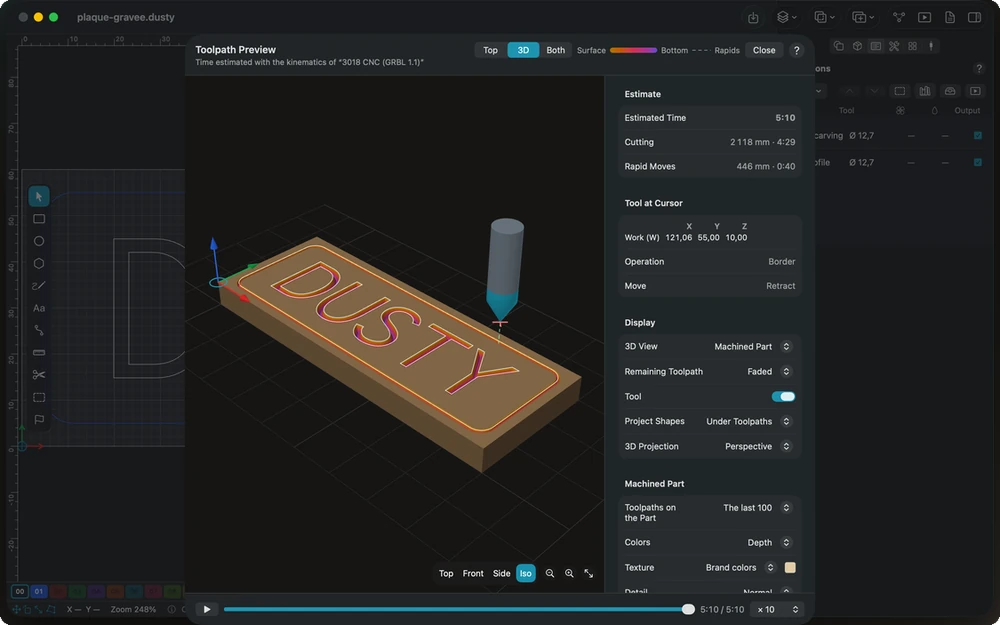
On the right:
- Estimate: estimated time, cutting distance and time, rapid moves, dwells;
- Tool at Cursor: tool position in the work coordinates, current operation and move;
- Display: content of the 3D view (toolpaths, machined part or both), remaining toolpath faded or hidden, tool shown or not, project shapes, projection of the 3D view;
- Machined Part (when it is shown): toolpaths on the part, colors, stock texture, level of detail, hidden pieces — see Machined part;
- Operations: a click puts the cursor at the start of one of them;
- 3D Check: collisions, rapid moves through material, plunges too fast, air cutting — see 3D check;
- Pre-send Check: see Pre-send check;
- Troubleshooting: see Preview troubleshooting.
The legend (at the top) recalls the colors: cuts from gold (surface) to purple (bottom), rapids dotted. The real durations of jobs, learned by the machining log, correct the estimate when you start a job.
In this section
-
Top view and 3D view
Show the job from above, in 3D or both side by side: cuts tinted by depth, rapids, the stock and the tool, with mouse, keyboard and touch controls.
-
Project shapes
Show the drawing's outlines as thin lines under or over the toolpaths, in the top view and the 3D view, to compare the paths with the shapes.
-
Machined part
Dusty carves the stock with the real shape of each tool and follows the time slider: colors by depth or operation, wood and metal textures, detail and hidden pieces.
-
3D check
A background check of every move against the material left: tool holder and shank collisions, rapids through material, plunges too fast and air cutting.
-
Preview troubleshooting
Answers to the usual questions in the preview: 3D check alerts, a wrong estimated time, a part that differs, shapes not machined, rounded inside corners.
-
Playback and time slider
Play the job at up to 200 times its speed or drag the time slider to any moment: the machined part and the tool position follow.
-
Pre-send check
What Dusty refuses before every send — rapids through material, toolpaths beyond the travel, no work zero, zero feed — and the warnings left to you.
This manual is also built into Dusty: press F1, or open the Help menu, to read the topic for what you are doing. A mistake, a missing answer? Tell us
Try it in Dusty, for free.
Free CNC milling software: design, toolpaths and machine control. Mac, iPad, iPhone, Windows and Linux.