Toolpaths
Tell Dusty how to cut; it computes every toolpath
Profiles, pockets, V-carving, drilling, fluting and texturing: each operation has its own settings, flags its problems and shows its pattern before you even open the preview.
In detail
Cutting out and clearing
- Profile cut-outs Outside, inside or on the line; holes cut before the outline of their part, and stock to leave for a finishing pass.
- Tabs where you want Spread automatically on outer outlines, placed with a click, or set by the tab assistant, which previews them in green.
- Pocket with islands Offset or raster clearing, islands left standing, stepover in % or mm, with clean-up loops in the corners when the step is wide.
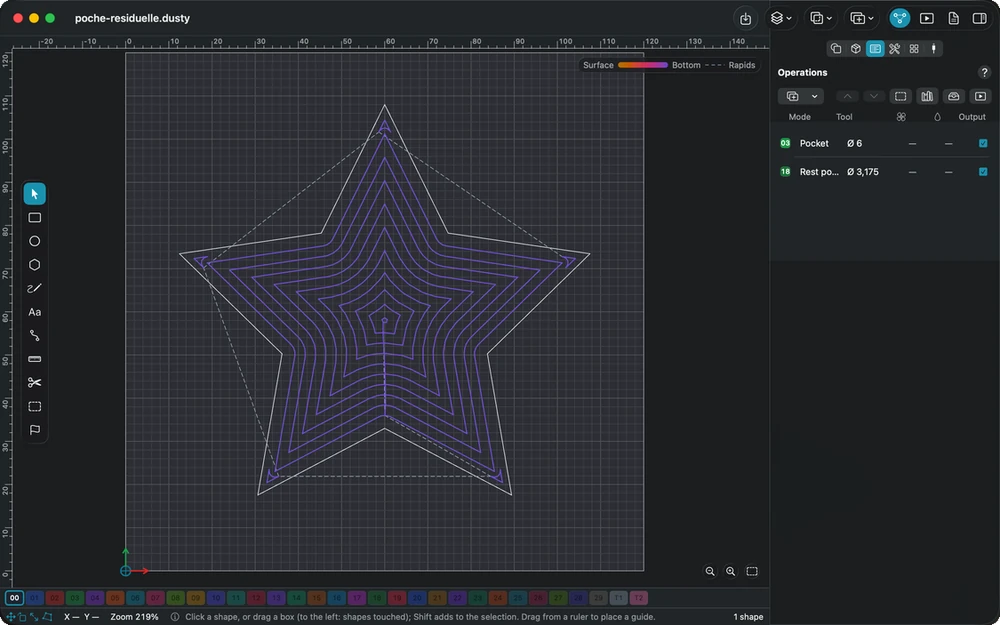
- Rest machining A smaller bit takes up only what the large one could not reach, with the tool change inserted between them.
- Dogbone slot Rectangles cleared with a round relief in each corner, so that square tenons fit — the drawing stays unchanged.
Engraving and decoration
- V-carving letters Grooves of varying width that follow the letters, cleared flat where you limit the depth; hundreds of characters computed in a second or two.
- Chamfer to width A bevel along the edges of a part or of its openings, at the width you ask for, with a V-bit.
- Decorative fluting Flutes with tapered ends and five ramp styles, previewed from the top and from the side before machining.
- Textured backgrounds A hammered or gouged look made of short random strokes; the same seed gives exactly the same texture every time.
Holes and surfaces
- Four drilling types Plunge, peck with dwell and retract, spot drilling, or a countersink sized from your V-bit’s included angle.
- Boring large holes Round holes larger than the bit, cut in a helix along the wall, then a flat turn at the bottom.
- Surfacing and facing Flatten the spoilboard in raster or offset passes from the outside inward, or face the top of the stock in raster.
- Open shapes as profiles A pocket ignores open shapes and says so; one command hands them to a profile on the line instead.
Strategy and order
- Gentle entries Plunge, zigzag ramp, spiral or helix into the material, at the ramp angle and feed you choose.
- Trochoidal paths Small loops that limit the bit’s engagement, for a weak spindle or a hard material, and allow deeper passes.
- Start point and direction Choose where each outline starts and which way it runs; climb or conventional, shown in a diagram.
- Machining order The list order is the cut order; repeated parts are machined operation by operation or part by part.
- Operations library Proven settings saved per machine, with a copy of their tool, and applied to new shapes in a single action.
In the manual
-
Machining operations
Tell Dusty what to machine and how: profile, pocket, V-carving, chamfer, drilling, boring, surfacing, fluting and texturing, with tabs, entries and trochoidal paths.
-
Tabs
Leave small bridges of material so that cut-out parts stay in place: tab type, size and height, automatic placement, the Tabs tool and the tab assistant.
-
V-carving
Carve grooves of varying width with a V-bit, the depth following the medial axis of the shapes: maximum depth with a flat bottom, passes and open shapes.
-
Trochoidal path
Small loops that advance along the path to limit tool engagement: less load on a weak spindle, deeper passes, and a wall pass for the exact size.
Explore the other features
- Drawing & text Draw exactly what the bit will cut
- Tools & feeds The right bit, the right feed, from the first cut
- 3D preview & checks See the part before the first chip flies
- Machine control Your CNC connected, zeroed and under control
- Workholding & safety Stock that stays put, a workshop that stays safe
- G-code & post-processors G-code written for your controller, in its own dialect
- Files & projects Your drawings open, your setup follows you
All this, for €0.
Every feature on this page is included, on every platform, for everyone.