Files & projects
Your drawings open, your setup follows you
SVG, DXF, PDF or another program's project: Dusty opens what you already have, keeps each project in one .dusty file and helps you learn along the way.
In detail
Import and export
- Vector files SVG, DXF, PDF, EPS, AI and HPGL/PLT at their real size; DXF units, texts and path closing are set in Settings.
- Other software’s projects A laser or CAM project opens with its shapes and colors — and, from CAM, its tools and operations — then a report of what to check.
- Images to trace PNG, JPEG, TIFF, BMP, GIF or WebP imported as a template to trace over; images themselves are never machined.
- Drawing export SVG, PDF, AI with one layer per Dusty layer, DXF, DXF R12, or modern DXF with native circles and B-splines.
- Print at scale 1 The stock printed at actual size, in black or in colors, to stick a template onto the workpiece.
Projects
- One .dusty file Drawing, setup, operations and a copy of the tools in a single file that reopens exactly as it was.
- Project assistant Machine, units, stock, origin, heights, first operation and its tool, in a few explained questions.
- Project templates A stock, tools, operations and a frame reused as a starting point, never overwritten by mistake.
- Pages and notes One page per sheet, each with its own stock and operations, and notes shown when the project opens.
- Art library Logos, motifs and jigs stored in .dustyart libraries and dragged onto the canvas, with eleven basic motifs drawn for Dusty.
Learning and help
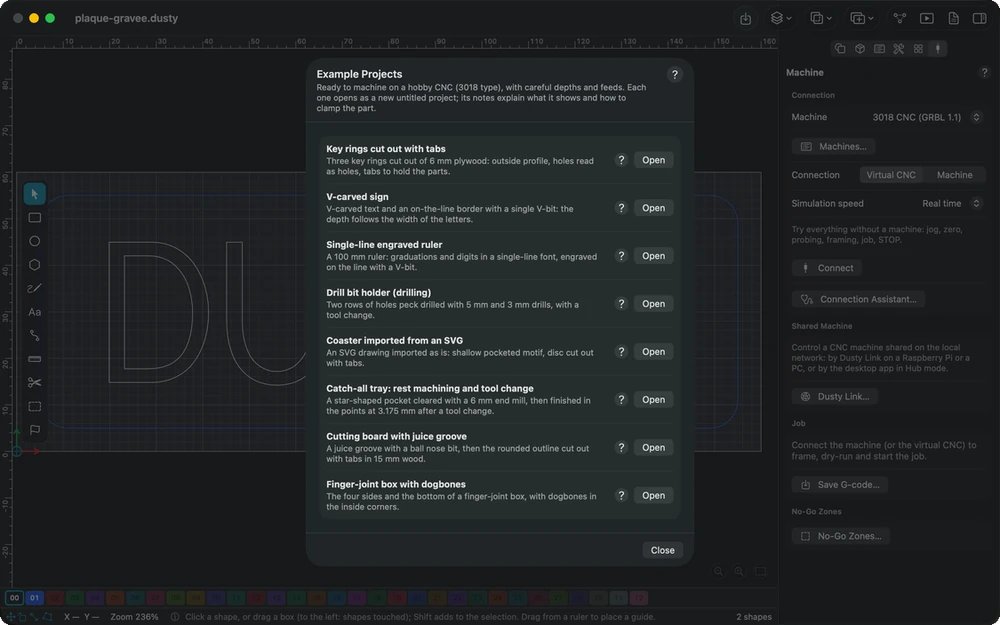
- Eight example projects Key rings, a V-carved sign, a ruler, a drill bit holder, a coaster, a tray, a cutting board and a box, each with its tutorial.
- Manual by collection Read the manual by theme: getting started, understanding machining, coming from laser, holding the work, series and more.
- My Machining Is… From a symptom — burnt edges, wrong depth, broken bit — to the likely causes, with figures and actions that open the right setting.
- Support data A support archive with personal details masked, shown file by file before you save it; Dusty never sends it.
Settings and automation
- AI assistant (MCP) On Mac, Windows and Linux, an assistant such as Claude prepares shapes, operations and checks; it never controls the machine.
- User bundles Settings, shortcuts, machines and libraries in one .dustypack file, to move to a new computer or an iPad.
- Automatic backups Settings backed up after each change, the 50 most recent kept, and restored after a confirmation.
- Custom shortcuts Every command listed with a search, conflicts reported, and F1 opening the manual at what you are doing.
- Display your way Grid contrast, larger handles, icon and text size, reduced animations — every window follows at once.
In the manual
-
Importing and exporting
Bring in drawings from SVG, DXF, PDF, AI, HPGL, LightBurn or MillMage, use web generators and the art library, then export the drawing or print it at scale 1.
-
The project
Everything a .dusty file holds — drawing, stock, tools and operations — and how to set the stock, origin, Z zero and heights, with templates, pages and notes.
-
Tutorials
Eight example projects for a 3018-type hobby CNC, each rebuilt step by step from a blank page to the G-code, then sent to the machine.
-
Assistant (MCP)
A conversational assistant such as Claude can prepare projects through MCP — shapes, tools, operations, checks, export — but never controls the machine.
Explore the other features
- Drawing & text Draw exactly what the bit will cut
- Toolpaths Tell Dusty how to cut; it computes every toolpath
- Tools & feeds The right bit, the right feed, from the first cut
- 3D preview & checks See the part before the first chip flies
- Machine control Your CNC connected, zeroed and under control
- Workholding & safety Stock that stays put, a workshop that stays safe
- G-code & post-processors G-code written for your controller, in its own dialect
All this, for €0.
Every feature on this page is included, on every platform, for everyone.