3D preview & checks
See the part before the first chip flies
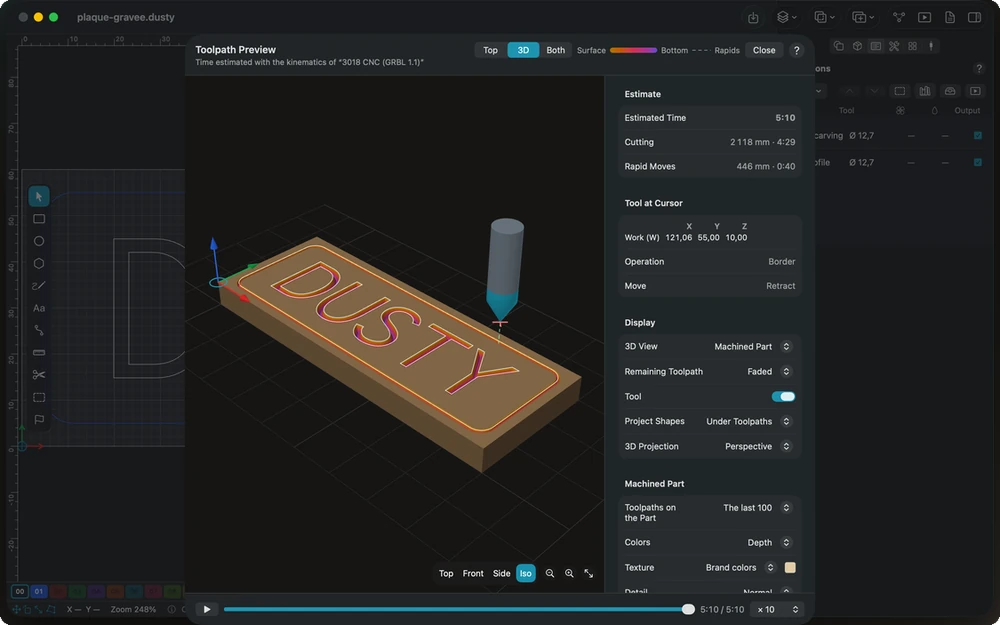
Dusty simulates the job with your machine's real accelerations, carves the part in 3D and refuses to send a program that would drive a rapid through the stock.
In detail
Preview
- Top, 3D or both Top view and 3D view side by side at the same moment, cuts tinted from gold at the surface to purple at the bottom.
- Playback and time slider Play the job at ×1, ×10, ×50 or ×200, or drag the slider to see the tool at any moment.
- Realistic time estimate Computed with the active machine’s speeds and accelerations, then corrected by your real jobs, learned in the machining log.
- Drawing over toolpaths The project’s outlines shown over or under the toolpaths, to compare what you drew with what will be cut.
Machined part
- The real tool shape Each move carves the stock with the bit’s true profile: flat, bull nose, ball, V, drill or round-over.
- Wood, paint and metal About fifteen woods, painted wood in thirteen colors, aluminum, brass and copper; the grain runs through the thickness.
- Colors by depth or operation See which operation machined what, or how deep each area goes; the untouched stock keeps its texture.
- Cut-out pieces hidden Double-click a piece cut all the way through to hide it and see the rest; pieces still held by tabs stay.
- Detail down to 0.0625 mm Four levels, the finest placing a point every 0.0625 mm for fine engravings; lower it for a very large stock.
3D check
- Holder and shank collisions The collet nut and the tool shank are checked against the material left at each move, with your holder diameter and stick-out.
- Rapids and plunges A rapid through material is a danger; a plunge more than 10% faster than the tool’s plunge rate, a warning.
- Air cutting found Moves at cutting feed that remove nothing, with the share of the cutting time they take up.
- Straight to the problem Each finding gives the G-code line, the operation, the position and the time; a click puts the tool right there.
Pre-send check
- Blocking findings Safe height below the stock, rapid through material, path outside the travel or work zero not set: sending is refused.
- Warnings you decide on Feed above the machine maximum, cutting into the spoilboard, leaving the stock, or a spindle to start by hand.
- Operation problems listed Open shapes, unsuitable tool, nothing to machine: each problem is shown with the name of its operation.
- Troubleshooting built in The usual questions — wrong time, rounded inside corners, shapes not machined — answered at the bottom of the preview.
In the manual
-
Preview
Compute the toolpaths and simulate the job with the active machine's kinematics: estimated time, top and 3D views, machined part, 3D check and pre-send check.
-
Machined part
Dusty carves the stock with the real shape of each tool and follows the time slider: colors by depth or operation, wood and metal textures, detail and hidden pieces.
-
3D check
A background check of every move against the material left: tool holder and shank collisions, rapids through material, plunges too fast and air cutting.
-
Pre-send check
What Dusty refuses before every send — rapids through material, toolpaths beyond the travel, no work zero, zero feed — and the warnings left to you.
Explore the other features
- Drawing & text Draw exactly what the bit will cut
- Toolpaths Tell Dusty how to cut; it computes every toolpath
- Tools & feeds The right bit, the right feed, from the first cut
- Machine control Your CNC connected, zeroed and under control
- Workholding & safety Stock that stays put, a workshop that stays safe
- G-code & post-processors G-code written for your controller, in its own dialect
- Files & projects Your drawings open, your setup follows you
All this, for €0.
Every feature on this page is included, on every platform, for everyone.