Machine control
Your CNC connected, zeroed and under control
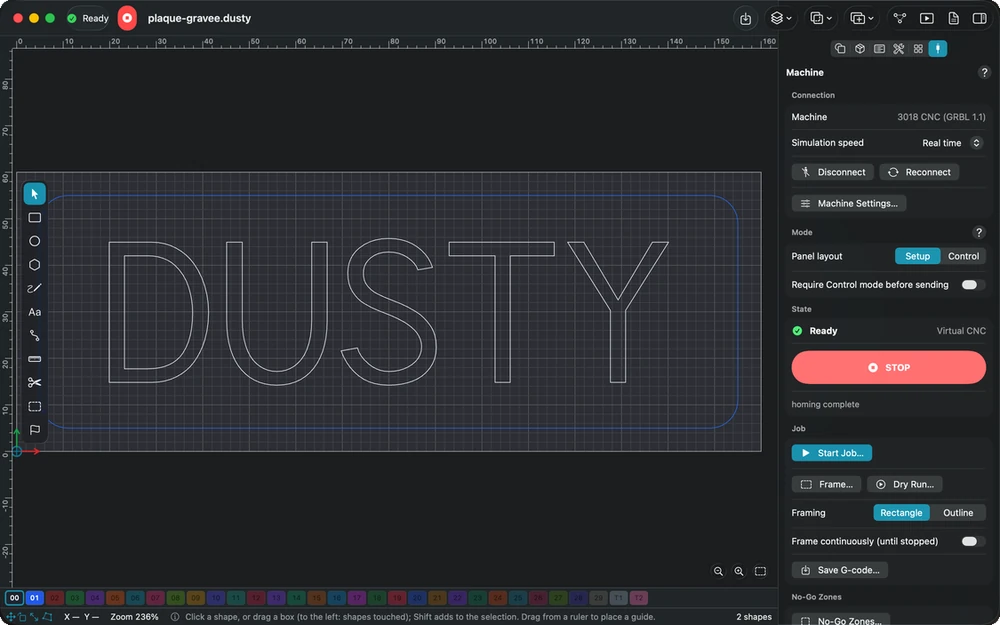
USB or network: Dusty finds the controller, reads its settings and leaves you in charge — every spindle start, job and resume waits for your agreement.
In detail
Connection
- USB or network USB on Mac and the desktop app, Wi-Fi or Ethernet on Mac, iPad and the desktop app; Dusty Link shares a USB CNC with the iPad.
- Connection assistant Ports, USB adapter driver, speeds and cable stability tried in one go, read-only, then the matching catalog model suggested.
- Supported controllers GRBL 1.1, grblHAL and FluidNC driven directly; Duet, Smoothieware and Marlin through a bridge of their own.
- A catalog of 67 machines Carbide 3D, FoxAlien, Genmitsu, Inventables, MillRight, Ooznest, OpenBuilds, Sienci, Snapmaker and more, or the preset 3018 CNC.
- Built-in virtual CNC A simulated machine, up to ×20 speed, to try jogging, probing, jobs, tool changes and STOP without any hardware.
- Controller settings Read at each connection, changes shown before → after and written with your agreement, automatic backups and the original settings kept.
Setting up
- Jog and homing Step or continuous jog from the screen or the keyboard; homing of all three axes, or of one if the controller allows it.
- Work zero and Go to Set X, Y and Z zero, then send the tool to exact coordinates by a path checked against the travel.
- Probing plate or block A Z plate or an XYZ block, fast approach then slow touch, and the origin carried over to your project’s.
- Tool length sensor A fixed sensor corrects the Z zero after a tool change, and can measure each tool during the job.
- Surface leveling A probed height map adapts every move, so an engraving keeps the same depth on a board that is not flat.
- Center finder and calibration Three points find the center of a round part; a measured test piece corrects steps per mm and squareness.
Running the job
- Frame and dry run The tool runs around the job at the safe height, spindle off, then plays the whole job raised above the stock.
- Your agreement first Spindle start, job start, resume and every measurement started by hand wait for your agreement; a checklist can be required too.
- Safe tool changes Z raised to the top of travel, spindle stopped and checked, before the prompt asks for the next bit.
- Resume an interrupted job After a stop, an alarm or a lost link, restart at the start of the pass or at an exact line.
- Live overrides Feed and spindle by steps of 10%, rapids at 25, 50 or 100%, with immediate effect during the job.
Workshop tools
- Saved positions and macros Jig corners and tool change spots reached by a safe route; macros on a button or a keyboard shortcut.
- Console with cheat sheet Type $$, $I or a G-code line; commands that start the spindle ask first, and settings resets are refused.
- Machining log Each job recorded with its estimated and real duration, the learned deviation, tool wear and a CSV export.
- Hour counter Machine and spindle hours, with lubrication, belt and bearing reminders that never interrupt or block a job.
- Controller SD card List and run the files on a grblHAL or FluidNC controller’s card, with STOP keeping priority.
In the manual
-
The machine
Connect and drive a GRBL, grblHAL or FluidNC machine: catalog and settings, connection assistant, jog and homing, zeros and probing, jobs, tool changes and safety.
-
Connection
Connect to the machine or to the virtual CNC, let Dusty read the controller settings, fix those that differ — GRBL laser mode included — and reconnect after a loss.
-
Probing
Set the zero with a Z plate or an XYZ block wired to the controller: position, values, a fast then slow touch, and what alarms 4 and 5 mean.
-
Running a job
Frame the job by rectangle or outline, do a dry run above the stock, read the pre-send check and the checklist, then agree to start: the spindle will turn.
Explore the other features
- Drawing & text Draw exactly what the bit will cut
- Toolpaths Tell Dusty how to cut; it computes every toolpath
- Tools & feeds The right bit, the right feed, from the first cut
- 3D preview & checks See the part before the first chip flies
- Workholding & safety Stock that stays put, a workshop that stays safe
- G-code & post-processors G-code written for your controller, in its own dialect
- Files & projects Your drawings open, your setup follows you
All this, for €0.
Every feature on this page is included, on every platform, for everyone.