Drawing & text
Draw exactly what the bit will cut
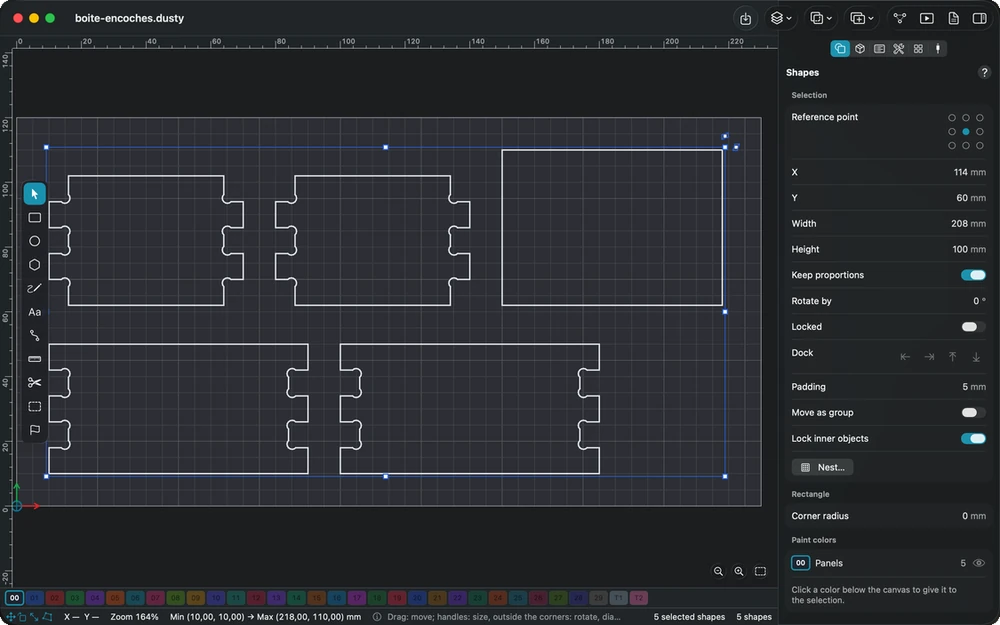
Dusty is a real vector editor built for machining: shapes, nodes, text and codes, every dimension measured from the point where you will set zero on the machine.
In detail
Workspace and tools
- Canvas to stock size The work area takes the exact size of your stock, with the origin marked where you will set zero on the machine.
- Rulers and guides Rulers graduated from the project origin, guides dragged onto the drawing, and dimensions shown near the pointer while you draw.
- Calculations in fields Type 100/3, 3/4″, 2cm or 50% in any number field: Dusty converts the result into the unit of the field.
- Basic shapes Rectangle with corners rounded by dragging, ellipse, polygon, triangle, star and double star, all still editable after drawing.
- Paths and nodes Corner and smooth nodes, a node bar, single-key node commands, segments bent by dragging, ends joined by dropping one onto the other.
- Fillets, notches, dogbones The Radius tool rounds or notches corners; one command adds a dogbone at the tool radius to every inside corner.
Editing shapes
- Booleans and weld Union, subtract, intersection, weld and cut with a shape; the Boolean assistant shows the five possible results side by side.
- Offset with a preview Outward, inward or both sides, with round, sharp or bevel corners; the result is drawn in pink before you confirm.
- Clean-up after import Close paths within a tolerance, join touching ends, delete duplicates, and fit runs of small segments to true lines and arcs.
- Slots to thickness Halved joints, dados, tenons and box fingers resized in one go to the real thickness of your material.
- Warp and deform Stretch the selection by its four corners, or reshape it freely with a grid of 16 handles.
- Image tracing The dark areas of a photo or a sketch become shapes — or a single center line down each stroke, for one-pass engraving.
Layout and series
- Align, distribute, dock Align on the last shape selected, distribute evenly, place on the stock, or slide each shape up to the first obstacle.
- Grid and circular arrays Staggered rows, mirrored columns, random orientation from a seed, and auto-numbered copies for a sheet of labels.
- Virtual arrays Linked clones that follow every change made to the originals and are machined just like them.
- Copy along a path By count or by spacing, turned with the curve, with a progressive size up to the last copy.
- True-shape nesting Parts fitted by their real outline to save material, rotation locked for the wood grain, new pages for what does not fit.
Text, codes and colors
- Text in your fonts Bold, italic, letter spacing, welded letters, text on an arc or along a path; your favorite fonts come first in the list.
- Single-line fonts Dusty Monotrait built in, and the SHX fonts you add: each letter drawn in a single stroke, for fast engraving with a V-bit.
- Variable text Serial numbers, date and time or CSV merge — and one page per record created in one go for a series.
- Barcodes and QR codes QR code, Data Matrix, EAN, UPC, Code 128 and more, with a verdict on whether your tool can cut each module.
- Paint colors Shapes sorted by color: an operation can machine every shape of its color, including the ones you add later.
In the manual
-
Drawing
Draw the shapes to machine: drawing tools, text and fonts, variable text and barcodes, single-line fonts, node editing, fillets and dogbones, measuring and display.
-
Editing and arranging
Select, align, combine, offset, warp, repeat and nest shapes, clean up imported paths, and trace images into shapes ready for machining.
-
Text
Type and set text: font, cap height, bold, spacing, alignment, welded letters, bent text and distorted letters, then machine it by V-carving or as a pocket.
-
Paint colors
Each shape has a paint color that groups the shapes of one machining step: an operation can machine all the shapes of its color, even those added later.
Explore the other features
- Toolpaths Tell Dusty how to cut; it computes every toolpath
- Tools & feeds The right bit, the right feed, from the first cut
- 3D preview & checks See the part before the first chip flies
- Machine control Your CNC connected, zeroed and under control
- Workholding & safety Stock that stays put, a workshop that stays safe
- G-code & post-processors G-code written for your controller, in its own dialect
- Files & projects Your drawings open, your setup follows you
All this, for €0.
Every feature on this page is included, on every platform, for everyone.