The short answer: a CNC 3018 (Genmitsu 3018-PRO, 3018-PROVer and their many clones) runs GRBL 1.1, so any GRBL program can drive it. The CNC 3018 software you need is a USB driver for its CH340 chip, a sender that connects at 115,200 baud, and a CAM program that turns a drawing into G-code. The Candle copy in the box only sends G-code, and it is often years old. Dusty does the design, the toolpaths and the machine control for free on Mac, Windows, Linux and iPad, with the 3018 in its machine catalog.
Below: the box, the software that runs today, the connection, GRBL settings, the Z probe, the real limits of a 3018, and a first job in Dusty. Machine figures come from SainSmart, maker of the Genmitsu machines, and from the GRBL documentation.
What comes in the box with a CNC 3018
Most 3018 kits share the same electronics: an Arduino-class board running GRBL 1.1f (the version SainSmart and Inventables list for the 3018-PRO), with the stepper drivers and the spindle output on the board, and a CH340 USB-to-serial chip. The spindle is a 775 DC motor with an ER11 collet; SainSmart puts the top speed of most of its stock spindles at about 10,000 rpm.
| Machine | Work area | Limit switches | Z probe |
|---|---|---|---|
| Genmitsu 3018-PRO | 300 × 180 × 45 mm | No (upgrade kits exist) | Optional |
| Genmitsu 3018-PROVer V2 | 290 × 180 × 40 mm | Yes, with an emergency stop | Included |
| Unbranded 3018 clones | Usually 300 × 180 × 45 mm | Varies | Varies |
On the USB stick, SD card or CD: the Windows CH340 driver, sample G-code files and GRBLControl, better known as Candle. The 3018-PRO resource page still offers Candle 1.17, and the 2020 PROVer manual describes Candle 1.1.7. Some kits add an offline controller, a small handheld screen that runs G-code from an SD card without a computer.
Which CNC 3018 software works today
A 3018 needs a sender to drive it and a CAM program to make the G-code. Here is what SainSmart points to, and what has changed since the stick was burned.
| Software | Role | Good to know on a 3018 |
|---|---|---|
| Candle 1.1.7 from the stick | Sender with a G-code viewer | Windows and Mac builds; SainSmart says it no longer runs on macOS Catalina or later |
| Candle, current release | Sender | Free (GPL-3.0); version 11.2 (February 2026) for Windows, macOS and Linux |
| Universal G-code Sender | Sender | SainSmart’s advice for recent Macs |
| Easel, Carveco Maker | Design and CAM | Both on SainSmart’s list; Easel runs in the browser, Carveco Maker is a paid subscription |
| Fusion for personal use | CAD and CAM | SainSmart’s Fusion guide picks the plain “GRBL” post, not “GRBL Laser”; a sender runs the file |
| Dusty | Design, CAM and sender | Free on Mac, iPad, Windows and Linux; 3018 profiles in the catalog |
So the free route is a sender plus a CAM program, or one app that does both. Prices and limits of the free tools are compared in our guide to free CNC software. For the laser module, SainSmart documents LightBurn.
How to connect a CNC 3018: driver, port and baud rate
- Windows: install the CH340 driver (CH341SER on SainSmart’s page) if the board does not show up as a COM port in the Device Manager.
- macOS: recent versions recognize CH340 adapters on their own; skip the old driver on the stick.
- Linux: your account must be in the
dialoutgroup (sudo usermod -aG dialout $USER, then log out and back in). - Speed: GRBL 1.1 talks at 115,200 baud, 8-N-1, per the GRBL settings documentation.
- Cable and power: a short USB data cable, no hub, away from the motor cables; the machine switched on and, on a PROVer, the emergency stop released.
- One program at a time: a port already open in Candle or another program refuses a second connection.
- iPad: it has no serial port; Dusty Link on a Raspberry Pi next to the machine shares the 3018 over the network.
A PROVer greets you in Alarm: it has limit switches and homing enabled, so GRBL locks motion until a homing cycle has run, as its manual explains. That is normal, not a fault.
GRBL settings worth checking on a 3018
Type $$ in a console to list them, and save the list before you change anything.
| Setting | What it does | On a 3018 |
|---|---|---|
| $100–$102 | Steps per mm, X, Y, Z | Set for the lead screws at the factory. Change only after measuring: jog 100 mm, measure, new = old × 100 ÷ measured |
| $110–$112 | Max rate, mm/min | SainSmart’s defaults: 1000, 1000 and 800. Raise them in steps, and stay 10 to 20% below the speed where a motor stalls |
| $130–$132 | Max travel, mm | 300, 180, 45 on a 3018-PRO; 290, 180, 40 on a PROVer V2. Used for homing and soft limits |
| $20 | Soft limits | Only with homing on ($22=1) and an accurate travel |
| $21, $22 | Hard limits, homing cycle | Only on a machine with limit switches |
| $30 | Max spindle speed | 1000 on SainSmart’s boards: S1000 then means full speed |
| $32 | Laser mode | 0 for the spindle; often left at 1 after using a laser module |
GRBL’s formula for steps per mm is (motor steps per turn × microsteps) ÷ mm of travel per turn. On speeds, SainSmart’s GRBL tuning guide measured its 3018s stalling around 2,100 mm/min and settled on 1600. A 3018 cuts far slower than that anyway: these rates mostly speed up rapids and jogging.
Z probe, touch plate and work zero on a 3018
A touch plate sets the Z zero by contact. The plate and an alligator clip on the bit are wired to the probe pins of the board; GRBL lowers the bit (G38.2) until it touches the plate, then subtracts the plate thickness to put Z zero on the top of the stock.
- Measure the plate with calipers, to 0.01 mm: SainSmart’s PROVer manual uses 14.19 mm as an example and asks you to enter your own figure.
- Check the wiring first: touch the clip to the plate and the GRBL status should show
Pn:P, the probe pin triggered. - Go slowly: SainSmart’s probe command searches at 100 mm/min, then touches again at 10 mm/min.
- Read the alarms: alarm 4 means the probe was already touching at the start; alarm 5, no contact within the search distance.
- No probe? SainSmart’s quick-start guide lowers Z in 0.1 mm, then 0.01 mm steps until a sheet of paper snags under the bit.
For X and Y, jog the bit tip over the corner you chose as the origin, usually the front left corner of the stock, and set X and Y zero (see work zero).
What a 3018 can really cut
A 3018 is a small, light machine: round 10 mm rails and a spindle of modest power. Inventables’ Easel notes that it is not rigid enough to cut as deep as the bit is wide in one pass. Shallow passes, sharp 1/8 in (3.175 mm) bits and modest feeds are the rule.
| Material | On a 3018 | Starting point |
|---|---|---|
| Plywood, MDF, softwood | Its home ground | 3.175 mm end mill, 1 mm per pass, 600 mm/min (24 IPM), 10,000 rpm, as in Dusty’s key rings example |
| Hardwood signs | Fine with V-bits | 60° V-bit, 1 mm per pass, 600 mm/min, 200 mm/min plunge |
| Plastics, acrylic | Good with single-flute bits | Keep the chip thick enough not to melt |
| PCB | Engraving and drilling | Cuts are tenths of a millimeter deep: level the board first |
| Aluminum | Possible, slowly | Tenths of a millimeter per pass, single flute, air blast |
Our guide to CNC feeds and speeds for wood works out these numbers for any bit.
How to set up a 3018 in Dusty
The eight example projects of Dusty are set for a 3018-type CNC, and its catalog of 67 machines has a Generic CNC 3018, the Genmitsu 3018-PRO and the 3018-PROVer V2. Try every step on the virtual CNC first. The names are those of the Windows and Linux app; a few differ on Mac and iPad.
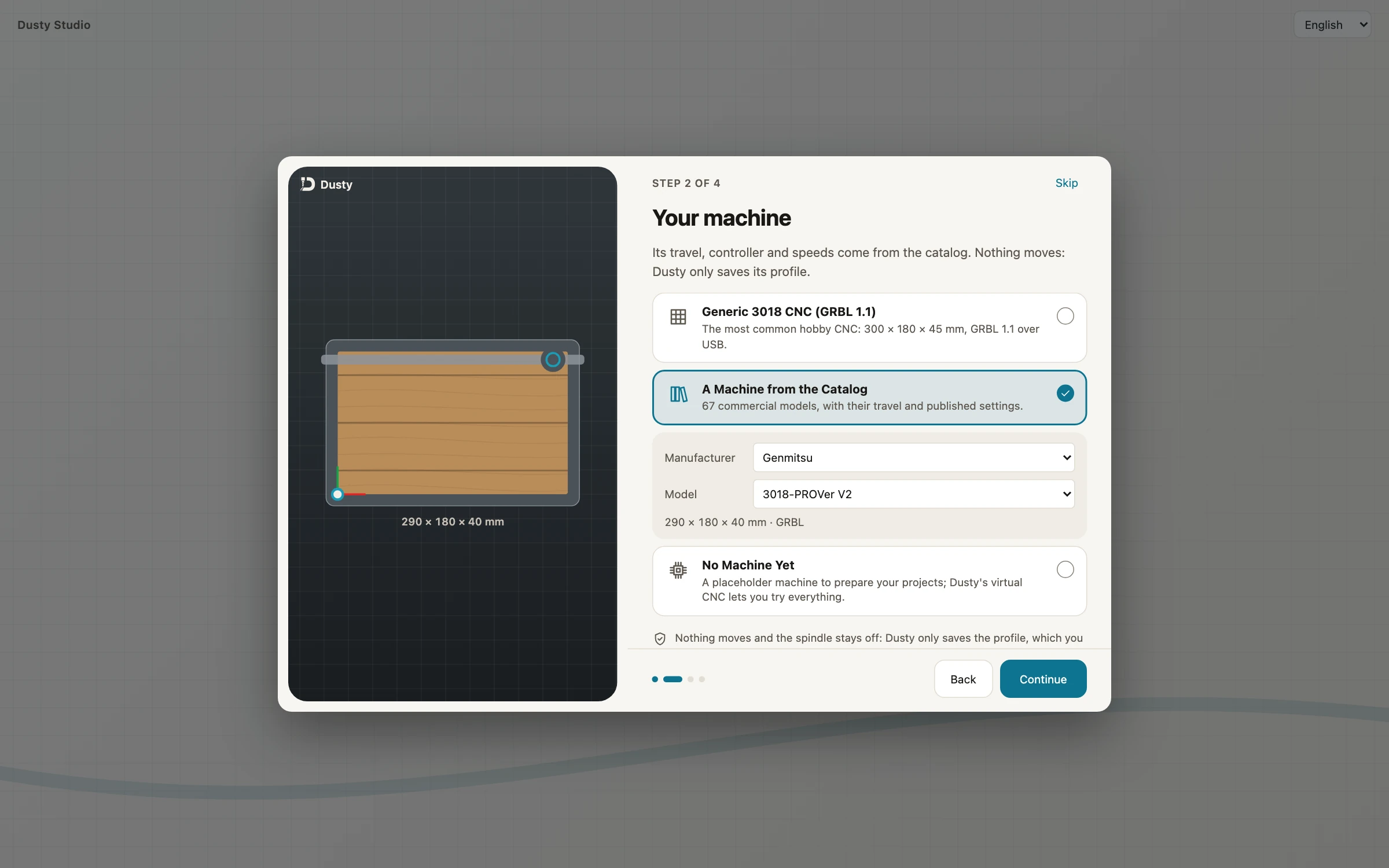
- Install Dusty and pick the machine. Install it from the download page. At step 2 of the tour, Your machine, keep Generic 3018 CNC (GRBL 1.1) for a clone, or choose A Machine from the Catalog, Manufacturer Genmitsu, Model 3018-PRO or 3018-PROVer V2. Help › Dusty Tour opens the tour again, and New Machine… in the Machine tab adds another machine.
- Connect. Plug in the USB cable and switch the machine on. In the Machine tab, choose USB port (or Virtual CNC for a dry try) and click Connect. If nothing answers, Connection Assistant… tries the ports and speeds without moving anything, and tells you what is missing: a CH340 driver on Windows, the
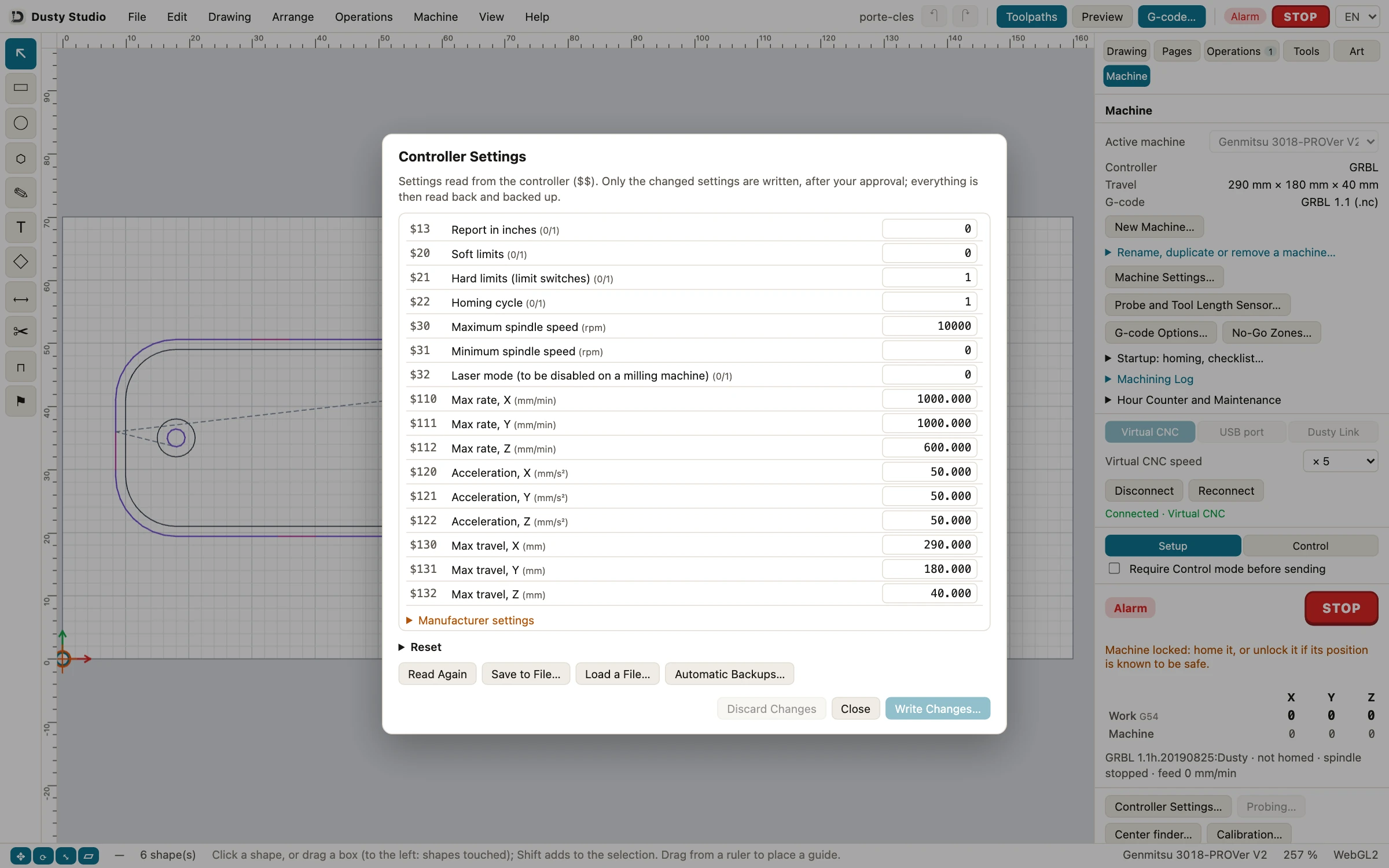
dialoutgroup on Linux, a data cable (see connection assistant). - Check the GRBL settings. Click Controller Settings…: Dusty lists the
$$values (limits, homing, spindle, laser mode, rates, travel), with steps per mm folded under Manufacturer settings. Only changed settings are written, after your approval, then read back and backed up (see controller settings). If laser mode is on, Dusty flags it and offers to write$32=0.
- Match the spindle. In Machine Settings…, under Spindle and Files, Maximum S value is your
$30, read at each connection (1000 on many 3018 boards); set Spindle speed at max S to the real top speed, about 10000 rpm. Dusty converts the tools’ rpm in that ratio. - Home or unlock. If the panel says the machine is locked, click Homing on a PROVer; on a machine without switches, Unlock, once you know its position is safe. Startup: homing, checklist… can offer homing at each connection.
- Open the first example. File › Open Example, then Open next to Key rings cut out with tabs: a 160 × 70 × 6 mm plywood stock with its origin at the bottom left corner, cut with a 3.175 mm end mill (see the key rings tutorial). Clamp the stock clear of the toolpaths.
- Set X and Y zero. In Jog, bring the bit tip over the front left corner of the stock (steps of 10, 1, then 0.1 mm) and click Zero XY.
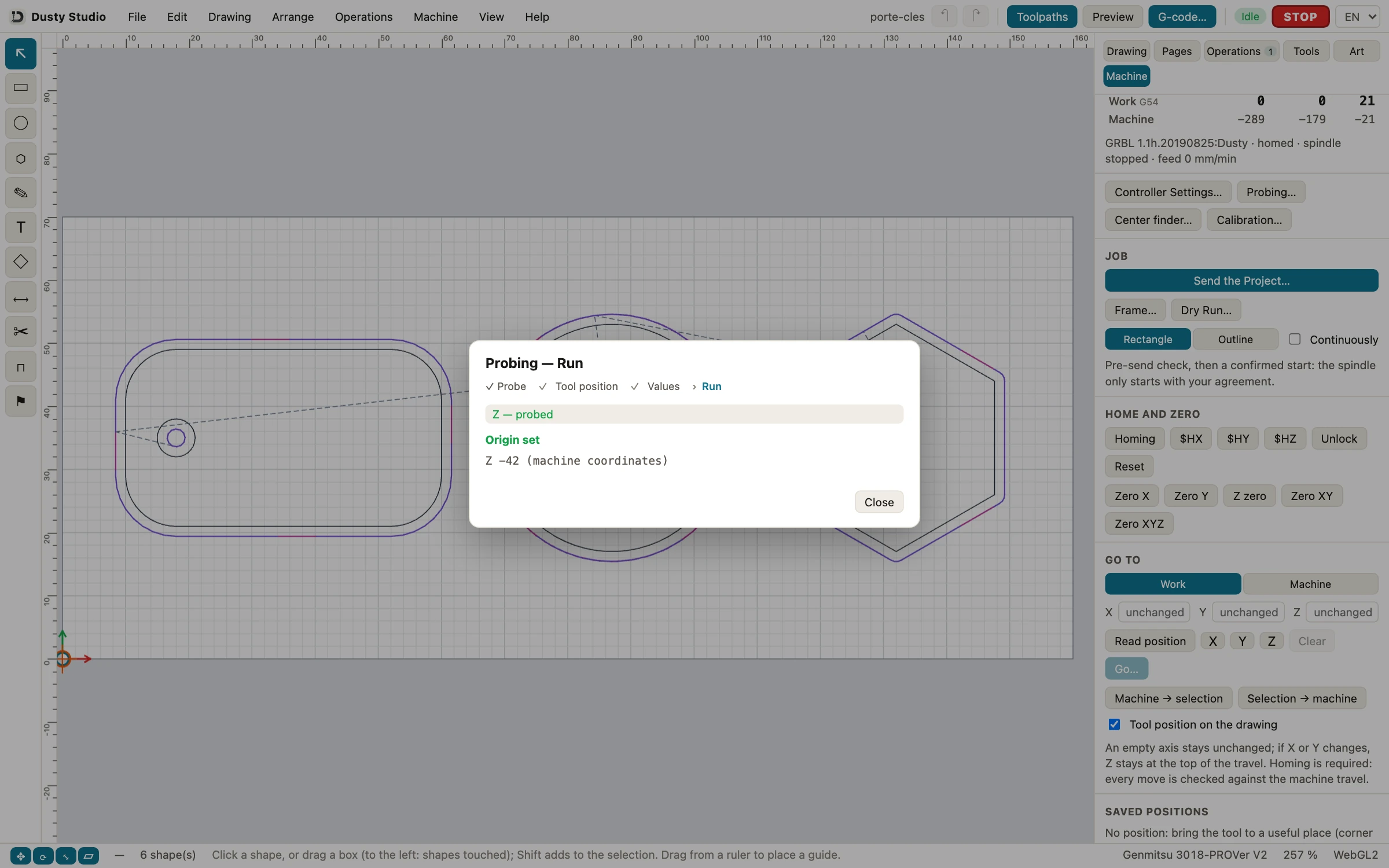
- Probe Z. Click Probing…, choose Z plate, then Next: bring the bit about 10 mm above the plate, clip on the bit. Under Values, enter your measured Plate thickness and keep the Fast speed under 200 mm/min. Click Prepare Probing, then Probe Z: Dusty answers Origin set. Remove the plate and the clip (see probing). Without a probe, lower the bit onto a sheet of paper and click Z zero.
- Frame, dry run, cut. Frame… runs around the job, spindle off; Dry Run… plays it above the stock. Then Send the Project… shows the pre-send check and asks your agreement before the spindle turns (on Mac: Start Job…). Lower the Feed override to 50% for the first part, and keep a hand near STOP (see running a job).
Set up your 3018 in Dusty, for free
Install Dusty on Mac, Windows, Linux or iPad, pick your 3018 in the catalog and run the key rings example on the virtual CNC before the first chip. No account, no subscription.
Before the first cut on a 3018
- Safety glasses on, hearing protection for long jobs, dust extraction running: MDF makes very fine dust.
- Stock clamped firmly, clamps outside the toolpaths and below the safe height.
- Hands away from the bit as soon as the machine can move; the emergency stop, or the power switch on a 3018-PRO, within reach.
- Probe plate and clip removed before the spindle starts.
- Frame and dry run done, first part with the feed override at 50%.
- Never leave the machine running unattended: a rubbing bit scorches wood, and hot chips can catch fire.
Next steps with your 3018
Once the key rings come out clean, the other examples add V-carving, drilling, pockets and tool changes. The machine control page lists the rest, from surface leveling for PCBs to steps per mm calibration, and controllers and connections what else Dusty drives. Download Dusty; if it saves you a bit or a board, a donation keeps it free for everyone.
Frequently asked questions
What software comes with a CNC 3018?
Usually Candle (GRBLControl) on a USB stick, SD card or CD, with the Windows CH340 driver and sample G-code files. Candle is a sender: it runs G-code but does not design parts or compute toolpaths, and the copy in the box is an old 1.1.7 build.
What is the best free software for a CNC 3018?
For 2.5D work (cut-outs, pockets, V-carved signs, drilling), an all-in-one app such as Dusty saves juggling a CAM program and a sender. Otherwise, pair a free CAM such as Fusion for personal use with Candle or Universal G-code Sender.
Does a CNC 3018 work with a Mac?
Yes. SainSmart says the Candle build on the stick no longer runs on macOS Catalina or later and points to Universal G-code Sender. Current Candle releases have a macOS version, and Dusty, on the Mac App Store, drives a 3018 over USB.
What baud rate does a CNC 3018 use?
GRBL 1.1 talks at 115,200 baud, 8-N-1. If a sender shows garbage or nothing, check that speed, the COM port, the CH340 driver on Windows and that no other program holds the port.
How do I connect a Z probe to a 3018?
Wire the plate and the clip to the probe pins of the board, clip on the bit, and touch the clip to the plate: GRBL should report the probe pin triggered (Pn:P). Then measure the plate thickness with calipers and enter it in your software.
Can a CNC 3018 cut aluminum?
Yes, slowly: tenths of a millimeter per pass, a sharp single-flute bit and air to clear the chips. Wood, MDF, plastics and PCBs suit its small spindle and light frame much better.