The short answer: free CNC software exists for every step of running a hobby CNC router, but most free tools cover only one step, or stop being free past a limit. You need CAD to draw the part, CAM to turn the drawing into toolpaths and G-code, and a sender to stream that G-code to the controller of the machine. Dusty does all three, for free, on Mac, Windows, Linux and iPad.
Below: what each step does, the free options and their real limits, a side-by-side table, and a first job in Dusty, step by step. Prices and licenses come from each publisher’s official site.
What software do you need for a CNC machine?
Three jobs, whatever your router. Some programs do one, a few do all three.
| Step | What it does | Free options |
|---|---|---|
| CAD (design) | Draw the part, or import an SVG or DXF. | FreeCAD, Fusion for personal use, Carbide Create, Easel, Dusty |
| CAM (toolpaths) | Pick the bit, depths and feeds; get the toolpaths and a G-code file. | FreeCAD, Kiri:Moto, Fusion for personal use, Carbide Create, Easel, Dusty |
| Sender (control) | Connect, home, set the zero, stream the G-code, pause or stop. | UGS, gSender, Candle, CNCjs, bCNC, Carbide Motion, Easel, Dusty |
Most hobby routers, from the 3018 to the Shapeoko, LongMill or X-Carve, run a GRBL-family controller (GRBL, grblHAL or FluidNC): any GRBL sender can drive them, and any CAM with a GRBL post-processor can feed them. So when you replace the software that came with your CNC, the real question is what each free tool leaves out. If yours is a 3018, our CNC 3018 software guide covers its driver, GRBL settings and Z probe.
The best free CAM software for CNC routers, honestly compared
Carbide Create
Carbide Create Core is free and covers 2D and 2.5D design and toolpaths with a 3D simulation. But Carbide 3D states that Core is designed for its own machines (Shapeoko, Nomad) and is not compatible with other CNCs. Standard G-code for any machine needs Carbide Create Pro: $120 per year as a subscription, which deactivates at the end of the term, or $360 once, with a 14-day trial. It runs on Windows and Mac only.
Easel
Easel, from Inventables, runs in the browser with an Easel account and drives the machine itself; Inventables says it supports any GRBL machine. Easel Basic is $0 but allows one carve or G-code export per week and leaves out V-carving and 3D carving. Starter costs $8 per month ($72 a year) for 20 carves or exports a week; Pro, $24 per month or $216 a year, removes the limit and adds V-carving.
Fusion for personal use
Autodesk Fusion is a complete 3D CAD and CAM suite, free for personal use when your projects are home-based, non-commercial and bring in less than $1,000 a year. The personal license has no rapid moves (every linking move runs at the cutting feed, so jobs take longer), cannot post a program that uses more than one tool (one file per tool), and keeps 10 documents editable at a time. It runs on Windows and macOS, not Linux, and you run its G-code with a sender.
FreeCAD and its CAM workbench
FreeCAD is free and open source (LGPL-2.1) and runs on Windows, macOS and Linux. Its CAM workbench (called Path in older versions) turns models into toolpaths and writes G-code through post-processors, GRBL included. It is a 3D modeler first, so a simple sign takes more steps than in a 2D tool.
Kiri:Moto
Kiri:Moto is a free, open-source (MIT) slicer that runs in the browser, for 3D printers, CNC mills and laser cutters, with desktop builds too. Its CNC mode writes G-code from a model you import; you then run the file with a sender.
Estlcam: cheap, not free
Estlcam often comes up in free software threads, but it is paid: €49 (or $59) for this Windows CAM and machine control program, on 3 computers with a year of updates. Its free version is fully functional, with longer and longer delays when you open and save files. Vectric VCarve, a favorite for signs, is paid and Windows-only.
Free G-code senders for GRBL machines
A sender computes no toolpaths: it connects, homes and jogs the machine, sets the work zero, then streams the G-code with pause and stop at hand. The free ones are mature, and most are open source.
| Sender | License | Platforms | Controllers | Good to know |
|---|---|---|---|---|
| Universal G-code Sender | GPLv3 | Windows, macOS, Linux, Raspberry Pi | GRBL, FluidNC, TinyG, g2core, Smoothieware | Designer editor for SVG, DXF and images |
| gSender | GPLv3 | Windows, Mac, Linux, Raspberry Pi | GRBL, grblHAL | By Sienci Labs, for any standard GRBL machine |
| Candle | GPL-3.0 | Windows, macOS, Linux | GRBL | Light, with a G-code viewer |
| CNCjs | MIT | Web interface, desktop app for Windows, Mac and Linux | Grbl, Marlin, Smoothieware, TinyG, g2core | Web-based, with pendants |
| bCNC | GPL-2.0 | Windows, Linux (Mac build reported broken) | grblHAL, GRBL | Basic CAM, Z probing and auto-leveling |
| Carbide Motion | Free with the machine | Windows, Mac | Shapeoko and Nomad only | Also runs G-code from other software |
Looking for a free Mach3 alternative? Mach3, Mach4, LinuxCNC (free, GPLv2) and UCCNC are machine control programs, not GRBL senders: keep yours and feed it G-code in its flavor.
Free CNC software side by side
| Software | Cost | Platforms | Design | Toolpaths | Drives the machine |
|---|---|---|---|---|---|
| Dusty | Free, no account | Mac, iPad, iPhone, Windows, Linux | Yes, plus SVG and DXF import | 2.5D | GRBL, grblHAL, FluidNC |
| Carbide Create Core + Motion | Free with a Carbide 3D machine | Windows, Mac | Yes | 2.5D, Carbide 3D machines only | Shapeoko, Nomad |
| Easel Basic | $0, one carve or export a week | Browser | Yes | Yes, no V-carving or 3D | Yes |
| Fusion for personal use | Free, non-commercial | Windows, macOS | 3D CAD | 2.5D and 3D, no rapids, one tool per file | No |
| FreeCAD | Free, open source | Windows, macOS, Linux | 3D CAD | CAM workbench | No |
| Kiri:Moto | Free, open source | Browser | Imports models | Yes | No |
| UGS, gSender, Candle, CNCjs | Free, open source | Windows, Mac, Linux | Little | Simple tools at most | Yes |
| Estlcam | €49 or $59; free version with delays | Windows | Imports DXF and SVG | 2D and 2.5D | Yes |
Dusty: design, toolpaths and machine control in one free app
Dusty has no account, no subscription, no ads and no paid tier. It lives on donations, which unlock nothing.
- Design and import. Shapes, text in your fonts, single-line fonts, booleans, offsets and dogbones; SVG, DXF, PDF, AI, EPS and HPGL files, LightBurn and MillMage projects (see files and projects).
- Real 2.5D toolpaths. Profile inside, outside or on the line with tabs, pocket and rest pocket, V-carving, chamfer, drilling, boring and surfacing, with a feeds and speeds calculator (see toolpaths).
- A check before the first chip. The 3D preview carves the part with the real shape of the bit and times the job; the pre-send check blocks a rapid through the material or a path outside the travel (see preview and checks).
- Machine control built in. GRBL 1.1, grblHAL and FluidNC over USB or the network: jog, zero, probing, framing, dry run, STOP always in sight, and a virtual CNC (see machine control). Duet, Smoothieware and Marlin go through new bridges, still to be tried on real boards.
- G-code for other controllers. 14 flavors, from GRBL to Mach3/Mach4, LinuxCNC, UCCNC, MASSO and Centroid (see G-code and post-processors).
- Your devices. Mac App Store, App Store for iPad and iPhone (the iPhone opens, checks and drives), Microsoft Store for Windows 10 and 11, APT and Flatpak on Linux. Dusty Link shares a USB machine from a Raspberry Pi with the workshop.
What Dusty does not do
Dusty is a 2.5D CAM: no 3D relief carving and no rotary axis in this version, and no laser work. The interface is in English and French. The iPad has no USB port, so it drives a network machine, a machine shared by Dusty Link, or the virtual CNC. Check that your machine is in the catalog of 67 machines, or set up its GRBL profile in a few fields (see controllers and connections).
How to go from drawing to G-code in Dusty
The eight example projects are set for a 3018-type CNC. Here is the first one: three key rings cut out with tabs from 6 mm plywood with a 3.175 mm (1/8 in) end mill, on the virtual CNC first. The names are those of the Windows and Linux app; a few differ on Mac and iPad (on Mac, the job starts with Start Job…). The second example has its own guide: how to V-carve a sign with a CNC router.
Prepare the job
- Install Dusty from the download page. At first launch, the tour asks which machine you have: pick it in the catalog, keep the preset 3018, or choose No Machine Yet.
- Open the example. File › Open Example (or Example Projects on the start screen), then Open next to Key rings cut out with tabs. The stock is 160 × 70 × 6 mm, with the origin at the bottom left corner.
- Check the tool. In the Tools tab, the project uses an End mill Ø 3.175 mm. Measure yours: diameter and number of flutes change the cut.
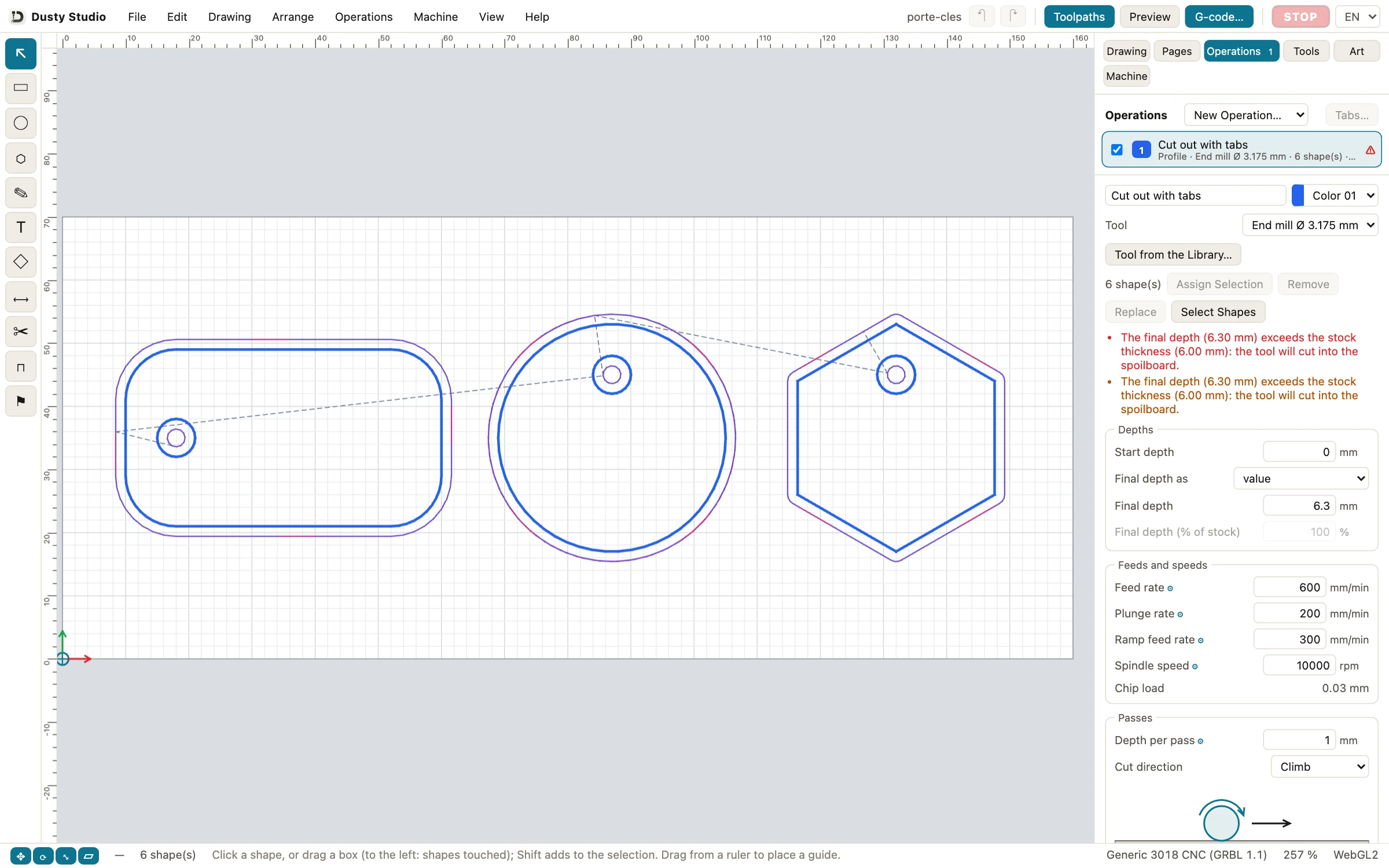
- Read the operation. In the Operations tab, click Cut out with tabs: a Profile, Side Outside, Final depth 6.3 mm (0.3 mm into the spoilboard to cut through), Depth per pass 1 mm, Feed rate 600 mm/min (about 24 IPM) and Spindle speed 10000 rpm, so a Chip load of 0.03 mm.
- Keep the tabs. Lower in the editor, Tabs is checked, with a Tab size of 6 mm and a Tab height of 1.5 mm: small bridges hold the parts until the end (see tabs).
- Show the toolpaths. Click Toolpaths in the top bar: the bit runs outside each outline and inside each hole, and the holes are cut before their part.
Check the job, then cut
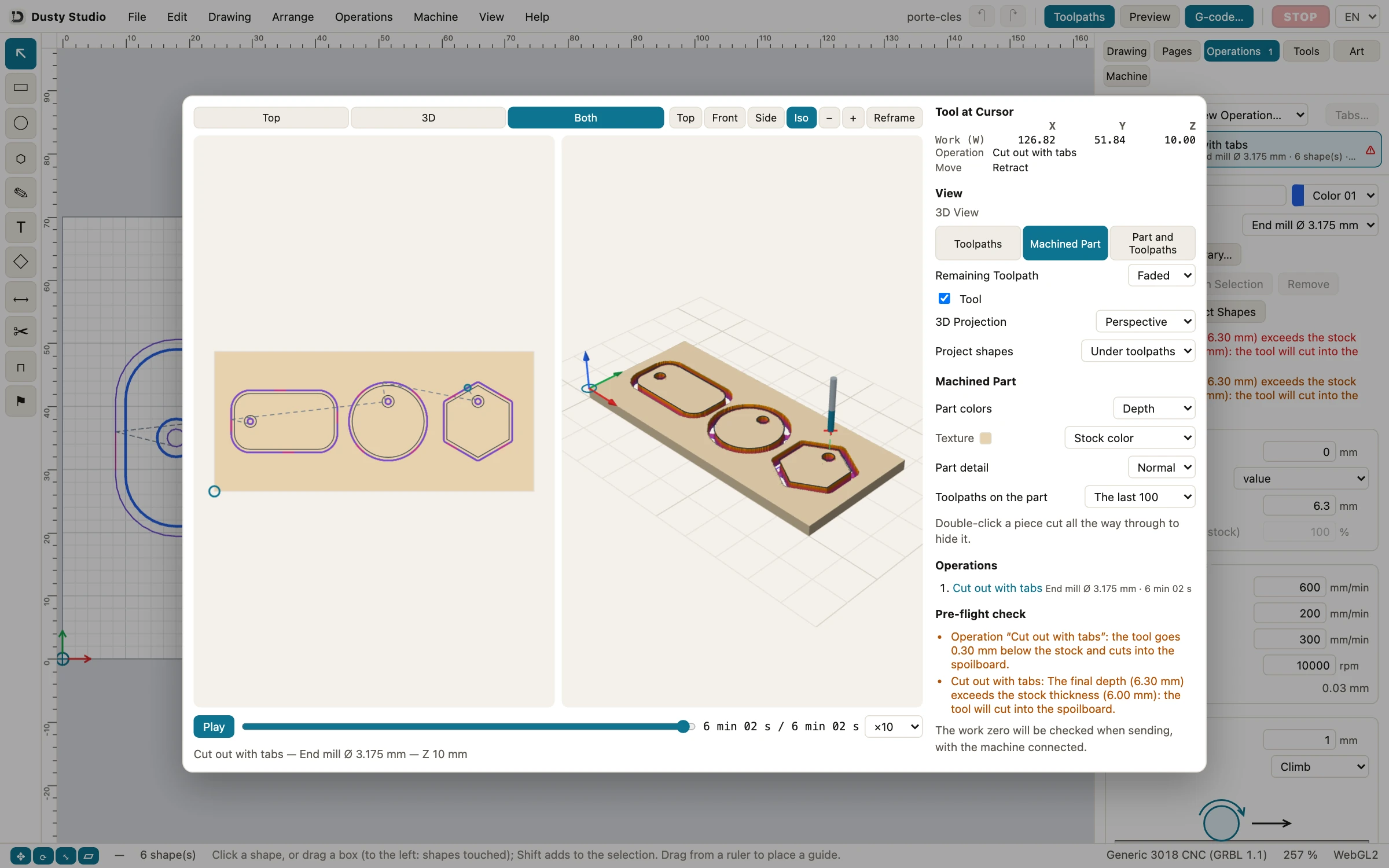
- Preview. Click Preview, then Machined Part: about 6 minutes on a 3018. The Pre-flight check only warns that the tool goes 0.30 mm into the spoilboard, which is expected for a through cut (see pre-send check).
- Save the G-code, if another program sends it: G-code… opens Export G-code; keep the Single file preset and click Export… to get a GRBL 1.1 .nc file.
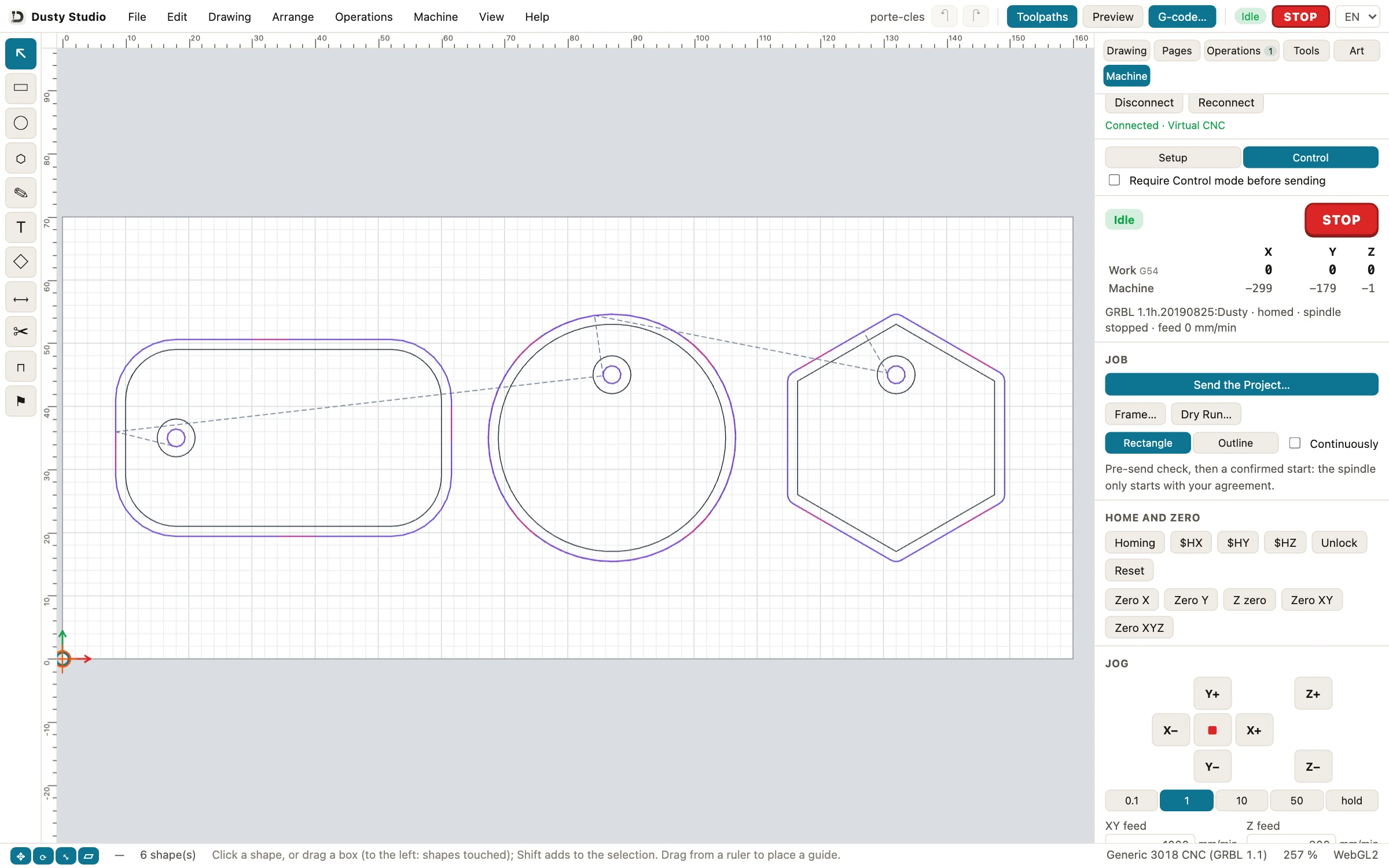
- Or drive the machine from Dusty. In the Machine tab, choose Virtual CNC (or USB port) and Connect. Home the machine, set the X and Y zero at the front left corner of the stock and the Z zero on its top, then Frame…, Dry Run… and Send the Project…. Nothing starts before you agree that the spindle will turn.
Cut these key rings, for free
Install Dusty on Mac, Windows, Linux or iPad, open the Key rings example and run it on the virtual CNC before the first chip. No account, no credit card.
Before the first cut with new software
- Check the G-code flavor: GRBL 1.1 for most hobby routers. A controller left in laser mode (
$32=1) must go back to$32=0for a router. - Check the units: 600 mm/min is about 24 IPM; a feed typed in the wrong unit is about 25 times off.
- Set the work zero where the project expects it: X and Y at the origin corner, Z on top of the stock.
- Frame the job, do a dry run in the air, then run the first part with the feed override at 50%.
- Glasses, hearing protection, dust extraction (MDF makes fine dust), clamps clear of the path, hands away from the bit, emergency stop within reach.
- Never leave the machine running unattended: a dull bit or hot chips can start a fire.
Which free CNC software should you choose?
- The best CNC router software for beginners keeps the three steps in one place: Dusty, free without limits, or Easel Basic if one carve a week is enough.
- A Shapeoko or Nomad: Carbide Create and Carbide Motion come free with the machine; Core will not do for another brand.
- CNC software for Mac: Dusty, Carbide Create, Fusion, FreeCAD, UGS, gSender, CNCjs and Candle run on a Mac; VCarve and Estlcam do not.
- Linux or a Raspberry Pi: FreeCAD, UGS, gSender, CNCjs, Candle and Dusty, with Dusty Link on the Pi next to the machine.
- 3D relief or a rotary axis: Fusion for personal use (non-commercial) or FreeCAD; Dusty stays 2.5D in this version.
- An iPad: Dusty draws, computes the toolpaths and drives a network machine there.
You can also mix: draw in one program, export SVG or DXF, cut with another. For the three steps in one free app, download Dusty; if it saves you a sheet of plywood, a donation keeps it free for everyone.
Frequently asked questions
What is the best free CAM software for a CNC router?
For 2.5D hobby work (cut-outs, pockets, V-carved signs, drilling), an all-in-one app such as Dusty is the simplest free choice. For 3D work, Fusion is free for non-commercial personal use, and FreeCAD is free and open source.
Is there free CNC software for Mac?
Yes. Dusty is on the Mac App Store, and Fusion, FreeCAD, Carbide Create, UGS, gSender, CNCjs and Candle all have Mac versions; Easel and Kiri:Moto run in the browser. Vectric VCarve and Estlcam are Windows programs.
Do I need a separate G-code sender?
Only if your CAM just writes G-code, as Fusion, FreeCAD and Kiri:Moto do. Then a free sender such as UGS, gSender, Candle or CNCjs runs the file. Dusty, Easel and Estlcam include machine control.
Is Carbide Create free for any CNC?
No. Carbide Create Core is free but designed for Carbide 3D machines and not compatible with other CNCs. Standard G-code for any machine needs Carbide Create Pro, at $120 a year or $360 once.
Is Easel free?
Easel Basic is $0 but limited to one carve or G-code export per week, without V-carving or 3D carving. Starter ($8 a month) allows 20 a week, and Pro ($24 a month) removes the limit.
Is Dusty really free?
Yes: no account, no subscription, no ads and no paid option, on Mac, iPad, iPhone, Windows and Linux. Dusty is funded by donations, which unlock nothing.