To set CNC feeds and speeds for wood, choose a chip load (the thickness of wood each flute cuts), then compute the feed: feed = chip load × number of flutes × spindle speed. A 6 mm (1/4 in) two-flute end mill at 12,000 rpm with a 0.05 mm chip load gives 1,200 mm/min (47 IPM). Start low, cut a test piece, and let the chips, the sound and the edges tell you which way to go.
Below: the formula in metric and inches, a starting chart for four woods, depth per pass, what the cut is telling you, acrylic and aluminum, and the same job in Dusty, a free CNC app with a feeds and speeds calculator.
Feed rate, spindle speed and chip load
The feed rate is how fast the bit moves through the material, in mm/min or inches per minute (IPM); the spindle speed, how fast it turns, in rpm. What decides the cut is the chip load: the thickness of the chip each flute takes at each turn.
- Chip too thin: the flute rubs instead of cutting, the bit heats, the wood burns and the edge dulls. Freud explains that a chip reduced to dust carries too little heat away from the carbide.
- Chip too thick: the bit and the machine strain, the walls get rough, a light machine loses steps, a small bit breaks.
So slowing the feed “to be safe” while the router screams at full speed is the classic mistake: the chip gets thinner, not safer.
The CNC feeds and speeds formula
| To find | Formula | Example |
|---|---|---|
| Feed rate | chip load × flutes × rpm | 0.05 mm × 2 × 12,000 = 1,200 mm/min |
| Chip load | feed ÷ (flutes × rpm) | 1,200 ÷ (2 × 12,000) = 0.05 mm |
| Spindle speed | feed ÷ (flutes × chip load) | 1,000 ÷ (2 × 0.05) = 10,000 rpm |
In inches: 0.002 in × 2 flutes × 12,000 rpm = 48 IPM; divide mm/min by 25.4 to get IPM. Onsrud, Freud and Amana Tool print these same formulas on their charts, with chip loads in inches per tooth.
Mind the flutes: at the same feed and speed, a single-flute bit takes a chip twice as thick as a two-flute bit, a three-flute bit a third thinner. Change bits, change the feed.
CNC feeds and speeds chart for wood: starting points
Bit makers give chip loads per material and diameter, for a depth of cut equal to the diameter. Freud’s chart for solid carbide bits gives 0.010 to 0.012 in (0.25 to 0.30 mm) per flute for a 1/4 in bit in softwood, 0.008 to 0.011 in in hardwood. Amana Tool’s chart for its spiral plunge bits, labeled “Industrial”, lists 24,000 rpm for 1/8 and 1/4 in bits. ToolsToday, which sells Amana bits, notes in its feeds and speeds guide that a bit rated at 400 IPM in MDF may need about 120 IPM on a smaller desktop CNC.
So on a hobby CNC, start well below the charts. Cautious starting points for two-flute carbide end mills, to refine with a test cut:
| Material | Bit | Chip load per flute | Feed at 10,000 rpm | Feed at 18,000 rpm | Depth per pass |
|---|---|---|---|---|---|
| Softwood (pine, fir) | 3.175 mm (1/8 in) | 0.03 → 0.05 mm | 600 mm/min (24 IPM) | 1,080 mm/min (43 IPM) | 1.5 mm |
| Softwood | 6–6.35 mm (1/4 in) | 0.06 → 0.10 mm | 1,200 mm/min (47 IPM) | 2,160 mm/min (85 IPM) | 3 mm |
| Hardwood (oak, maple, walnut) | 3.175 mm | 0.02 → 0.04 mm | 400 mm/min (16 IPM) | 720 mm/min (28 IPM) | 1 mm |
| Hardwood | 6–6.35 mm | 0.05 → 0.09 mm | 1,000 mm/min (39 IPM) | 1,800 mm/min (71 IPM) | 2 mm |
| MDF | 3.175 mm | 0.03 → 0.05 mm | 600 mm/min (24 IPM) | 1,080 mm/min (43 IPM) | 1.5 mm |
| MDF | 6–6.35 mm | 0.06 → 0.10 mm | 1,200 mm/min (47 IPM) | 2,160 mm/min (85 IPM) | 3 mm |
| Plywood | 3.175 mm | 0.03 → 0.04 mm | 600 mm/min (24 IPM) | 1,080 mm/min (43 IPM) | 1.5 mm |
| Plywood | 6–6.35 mm | 0.05 → 0.09 mm | 1,000 mm/min (39 IPM) | 1,800 mm/min (71 IPM) | 2.5 mm |
Feeds use the lower chip load; the higher one comes after a clean test. Single flute: halve the feed; three flutes: ×1.5. The depths suit a Shapeoko, LongMill or Onefinity; on a 3018, start at 1 mm, as Dusty’s examples do. These chip loads are a quarter to a half of the makers’ figures, in line with Dusty’s examples and calculator. Our CNC 3018 setup guide covers the rest of what a 3018 can cut.
Spindle speed on a hobby CNC
- 3018-type CNC: the stock 775 spindle turns at about 10,000 rpm and is rated around 60 W (SainSmart’s figures for the Genmitsu 3018-PROVer): shallow passes.
- Makita RT0701C: 10,000 to 30,000 rpm; its manual gives about 10,000 rpm on dial 1, 12,000 on 2, 17,000 on 3, 22,000 on 4, 27,000 on 5, 30,000 on 6.
- DeWalt DWP611: variable, up to 27,000 rpm; retailers list its lowest setting at about 16,000 rpm.
A light machine cannot feed very fast, so at full router speed its chips get thin. Turn the router down (dial 1 to 3 on a Makita) and keep the chip load, as Dusty’s calculator does. Makita warns that long runs at low speed overload the motor: watch its temperature.
Depth per pass, stepover and plunge rate
- Depth per pass: start at half the bit diameter in softwood, MDF and plywood, less in hardwood, aluminum or with a long bit (see stepover and depth per pass). Freud and Onsrud cut the chip load by 25% at a depth of 2 × the diameter, by 50% at 3 ×.
- Radial engagement: a profile cut or the first pass of a pocket is a full-width slot, the hardest case; a pocket at a 40 to 50% stepover loads the bit less. In a light finishing pass, the real chip is thinner than the formula says (chip thinning): the feed can go up a little.
- Plunge rate: most bits cut poorly with their tip. Plunge at about half the feed or less, or better, enter on a ramp or a helix.
Reading the cut: chips, sound, burns and broken bits
Change one thing at a time and write down what you changed.
| What you see or hear | Likely cause | What to change |
|---|---|---|
| Fine dust instead of chips | Chip too thin, or a dull bit | Raise the feed or lower the rpm |
| Burnt edges, smoke, burning smell | Rubbing: feed too slow for the rpm, dull or resin-coated bit, chips recut | Raise the feed or lower the rpm; clean the bit; clear the chips |
| Screeching, chatter, wavy walls | Pass too deep, stepover too wide, long stick-out, loose stock | Reduce depth or stepover first; shorten the bit; clamp better |
| The bit snaps | Chip too thick or pass too deep | Lower the feed, take shallower passes |
| The rest of the job is offset | Lost steps: machine overloaded | Lighter passes, lower feed |
| Fuzzy top edges | Upcut bit lifting fibers, or a dull bit | Downcut or compression bit, sharp bit |
Carbide 3D adds two checks in its feeds and speeds series: a bit that breaks suddenly, often at the same spot, means the feed is too high; and a bit should come out of the job lukewarm, not hot.
Acrylic and aluminum: what changes
Acrylic: a single-flute O-flute bit for plastics. Cast acrylic machines more cleanly than extruded, which is more sensitive to heat. Melting means a chip too thin or chips not clearing: keep the feed up and blow air at the bit. ToolsToday’s acrylic guide runs a 1/8 in O-flute at 18,000 rpm and 80 IPM (about 2,000 mm/min), 0.03 in (0.76 mm) per pass.
Aluminum: one or two flutes, very light passes, a blast of air. Stepcraft cuts 6061 with a 1/8 in single flute at about 13,000 rpm, 1,200 mm/min and 0.5 mm (0.020 in) per pass, with air rather than heavy lubricant. On a small machine, start lighter.
How to set feeds and speeds in Dusty
In Dusty, every tool and operation shows its chip load, the Feeds and Speeds Calculator suggests values for a material and the active machine, and My Machining Is… starts from what you see. Here is the cutting board example, set for a 3018: 15 mm hardwood, cut out with a 6 mm two-flute end mill. The names are those of the Windows and Linux app; a few differ on Mac and iPad.
- Open the example. Install Dusty from the download page, then File › Open Example and Open next to Cutting board with juice groove: a 240 × 160 × 15 mm stock, a Ball mill Ø 6 mm for the groove and an End mill Ø 6 mm for the outline.
- Read the chip loads. In the Tools tab, click End mill Ø 6 mm: 2 flutes, Feed rate 900 mm/min, Spindle speed 10000 rpm, so a Chip load of 0.05 mm. In the Operations tab, Cut out with tabs runs at 700 mm/min: 0.035 mm. For your own bit, enter its exact diameter and number of flutes (see feed, speed and chip load).
- Set the calculator. Lower in the tool editor, under Feeds and Speeds Calculator, choose Hardwood (oak, beech, walnut) and type 100 in Radial Engagement: the outline is cut as a full-width slot. Open Machine and Spindle: Dusty read the project’s generic 3018, a Desktop CNC (3018, 4040) from 1000 to 10000 rpm, 80 W, 1000 mm/min at most. For a router, choose Rigid hobby router and enter its figures.
- Read the result. Dusty suggests 5800 rpm, 1000 mm/min, a 300 mm/min plunge, 1.26 mm per pass and a Chip load of 0.086 mm, and says why: the machine caps the feed, so it slows the spindle to keep the chips thick.
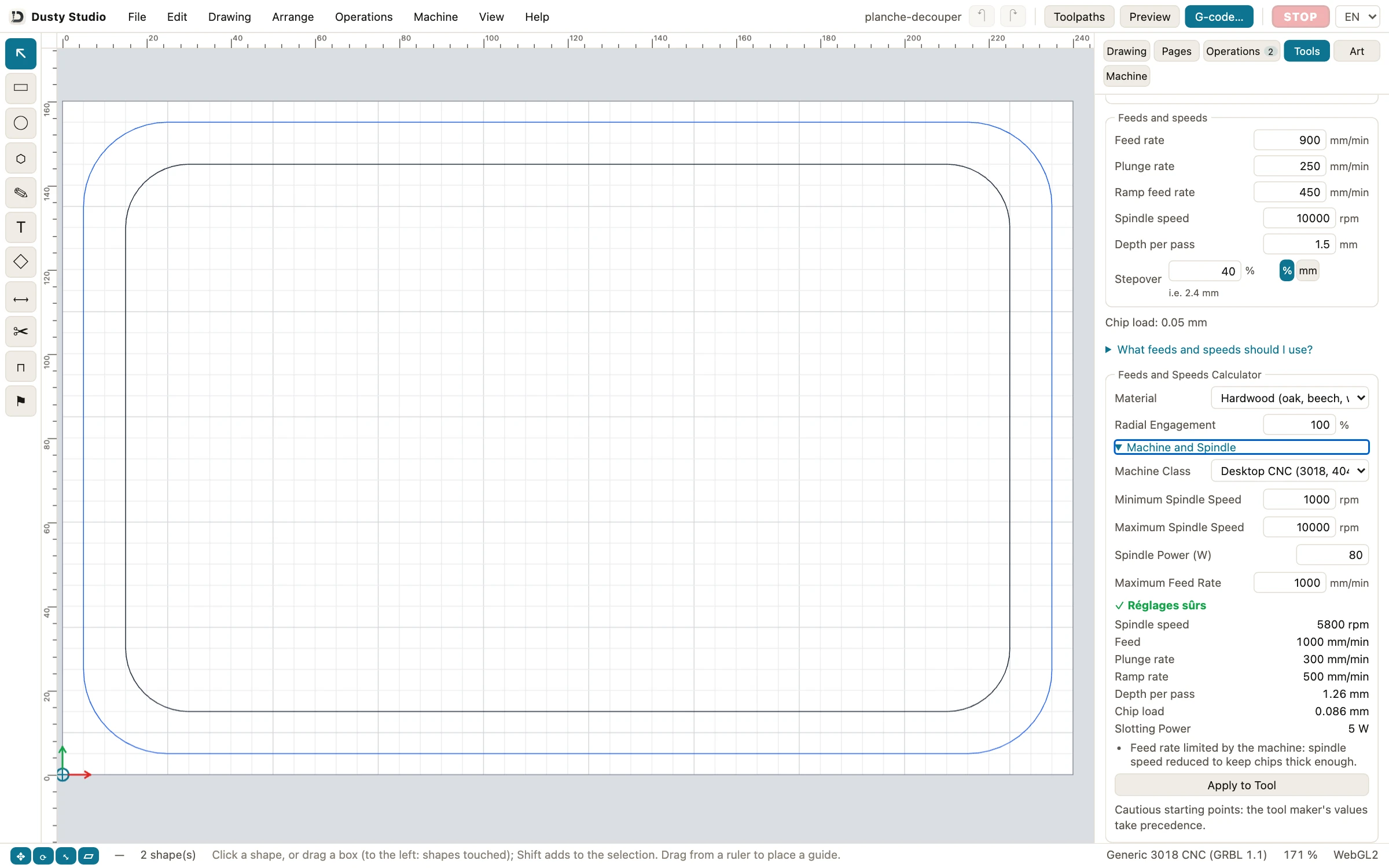
- Apply the values. Click Apply to Tool. An operation copies the feeds of its tool when it chooses it: in Operations, click Cut out with tabs, pick Ball mill Ø 6 mm in Tool, then End mill Ø 6 mm again. The operation now runs at 1000 mm/min and 5800 rpm, with a Chip load of 0.086 mm (see common settings).
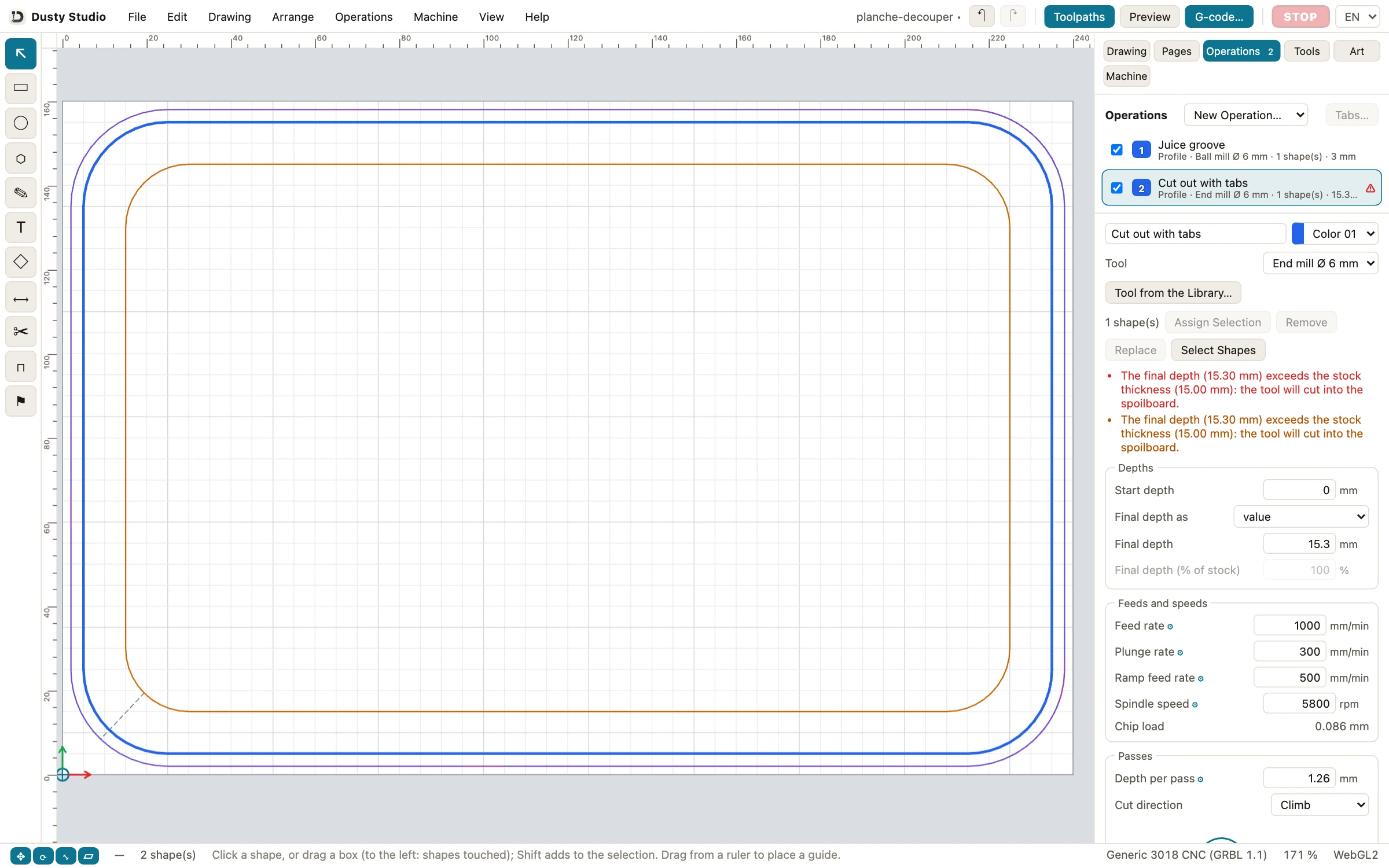
- Check the job. Click Preview: the estimate drops from 20 min 20 s to 13 min 02 s. The 3D Check finds no collision and no Plunge too fast, the warning for a bit diving into the wood faster than its plunge rate (see 3D check).
- Cut a test. On an offcut of the same wood, in the Machine tab: Frame…, Dry Run…, then Send the Project…; nothing starts before you agree that the spindle will turn. Set a hand-started router’s dial yourself. Adjust the feed override in 10% steps until chips and sound are right, write the feed back in the tool, note the wood in Notes and click Copy to Library (see tool library).
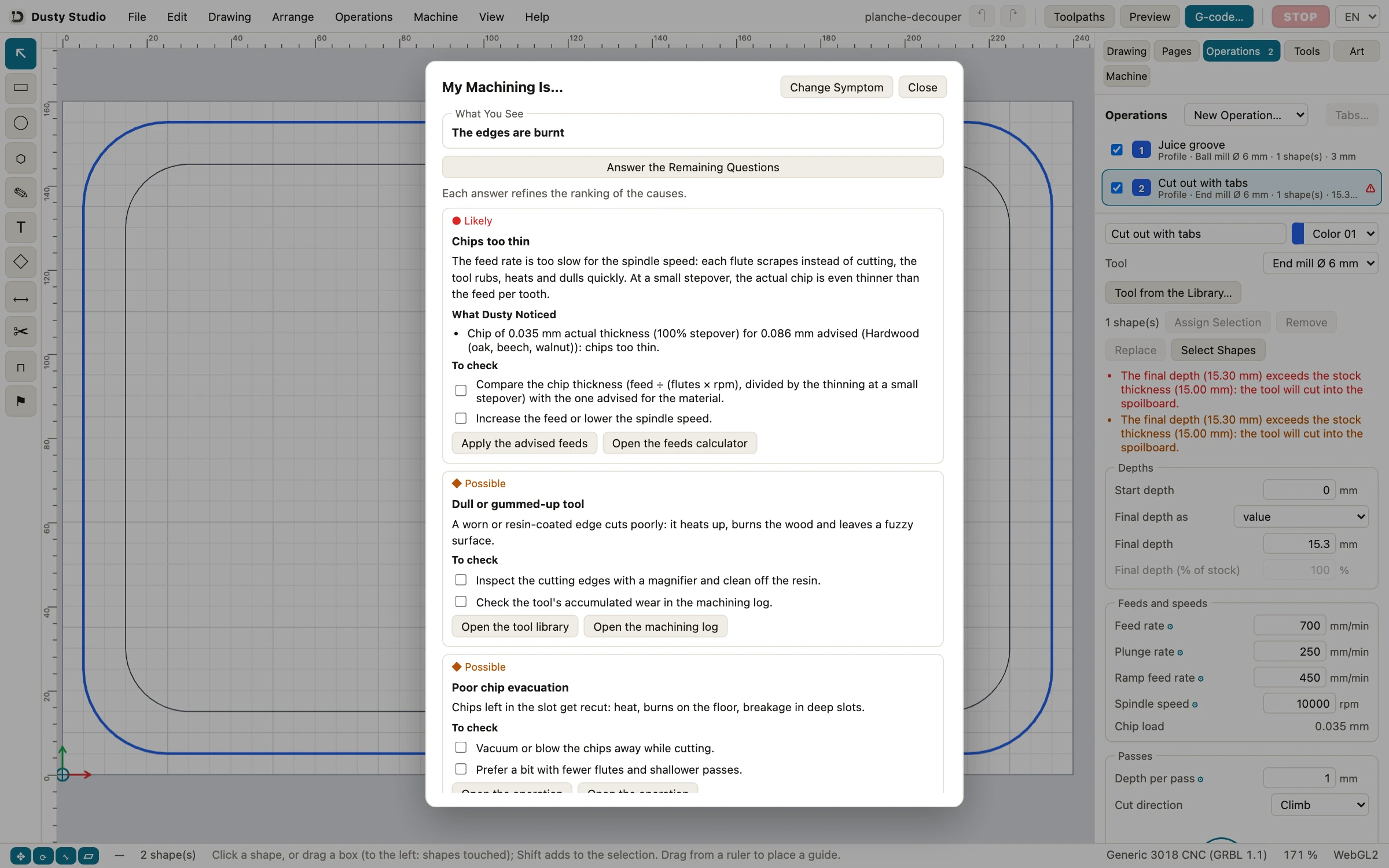
- If the cut goes wrong, ask. Help › My Machining Is…: under What Dusty Knows, choose the operation and the material, pick a symptom such as The edges are burnt, then Show the Diagnosis Now. With the example’s original 700 mm/min, Dusty ranks Chips too thin as likely: 0.035 mm for 0.086 mm advised (see My Machining Is…).
Try these feeds and speeds, for free
Install Dusty on Mac, Windows, Linux or iPad, open the Cutting board example and compare its chip load with the calculator before the first chip. No account, no subscription.
Before a test cut
- Safety glasses, hearing protection, dust extraction running: MDF makes very fine dust.
- Stock clamped firmly, clamps outside the toolpaths and below the safe height.
- Hands away from the bit as soon as the machine can move; emergency stop within reach.
- A sharp, clean bit, with its diameter and number of flutes entered exactly.
- First cut on an offcut of the same material, feed override ready to lower.
- Never leave the machine running unattended: a rubbing bit scorches wood, and hot chips can catch fire.
Build your own feeds and speeds chart
The best chart is the one you write: for each bit, material and machine, the feed, speed and depth that gave clean chips and a quiet cut. In Dusty, the tool library keeps them with your notes, and the tools and feeds page lists the rest. For V-bits, our guide to V-carving a sign gives tested values. Download Dusty; if it saves you a bit or a board, a donation keeps it free for everyone.
Frequently asked questions
How do you calculate feeds and speeds for a CNC router?
Multiply the chip load by the number of flutes and the spindle speed: feed = chip load × flutes × rpm. A 0.05 mm chip load with a two-flute bit at 12,000 rpm gives 1,200 mm/min, about 47 IPM. Then adjust after a test cut.
What is a good chip load for wood on a hobby CNC?
Start around 0.02 to 0.05 mm per flute with a 1/8 in bit and 0.05 to 0.10 mm with a 1/4 in bit, lower in hardwood. Bit makers’ charts give higher values, meant for rigid industrial machines.
What spindle speed should I use for wood?
On a hobby machine, often the low end of the router, 10,000 to 18,000 rpm. A light machine cannot feed fast enough for 30,000 rpm, so the chips get thin and the bit rubs.
Why is my CNC burning the wood?
Usually because the bit rubs: the feed is too slow for the spindle speed, the bit is dull or coated with resin, or chips are recut in a deep slot. Raise the feed or lower the rpm, and clean the bit.
What feeds and speeds for acrylic and aluminum?
Single-flute bits, a healthy chip load and air to clear the chips: for example 80 IPM at 18,000 rpm for a 1/8 in O-flute in acrylic (ToolsToday), 1,200 mm/min at about 13,000 rpm and 0.5 mm per pass in aluminum (Stepcraft).
Is there a free CNC feeds and speeds calculator?
Yes. Dusty, free on Mac, iPad, Windows and Linux, has a feeds and speeds calculator in each tool for eight materials and the active machine, and shows the chip load of every tool and operation.